

Smarter SharePoint Starts with Copilot Agents

Every few years, SharePoint gets another chance to be the place where work actually flows. Sometimes it works. Sometimes it… doesn’t. Copilot Agents might finally be the thing that makes it better, again
SharePoint Sucks!... Again. Fixing it with Copilot Agents.
Your organization made the move to the cloud. Physical servers and scattered personal drive files are a thing of the past. SharePoint is now the central hub for organizational knowledge and documents. But what if you could do more than just store, share, and search? Enter Copilot Agents—your new AI-powered partners for navigating SharePoint with speed and intelligence.
In this blog I'm going to show you how Copilot is transforming the SharePoint experience—making it smarter, more conversational, and useful.
Let’s be honest, SharePoint can be a very powerful and at times frustrating tool. Search capability has the ability to surface organizational knowledge quickly and efficiently but depends on thoughtful site structure and tagging. The content strategy that makes SharePoint an effective tool is still important, but today, search is being replaced by something new.
AI is now the go-to method for finding answers. All the major search engines now provide an AI result as the primary result. This pattern is now available for your organization, and this changes how we interact with SharePoint entirely. It's time to make SharePoint better... again.
🤖 What Is a Copilot Agent?
You may have seen this already show up but Copilot Agents (if enabled by your IT) are now showing up directly in your SharePoint sites. Users can find them in the Copilot menu at the top of any SharePoint site.
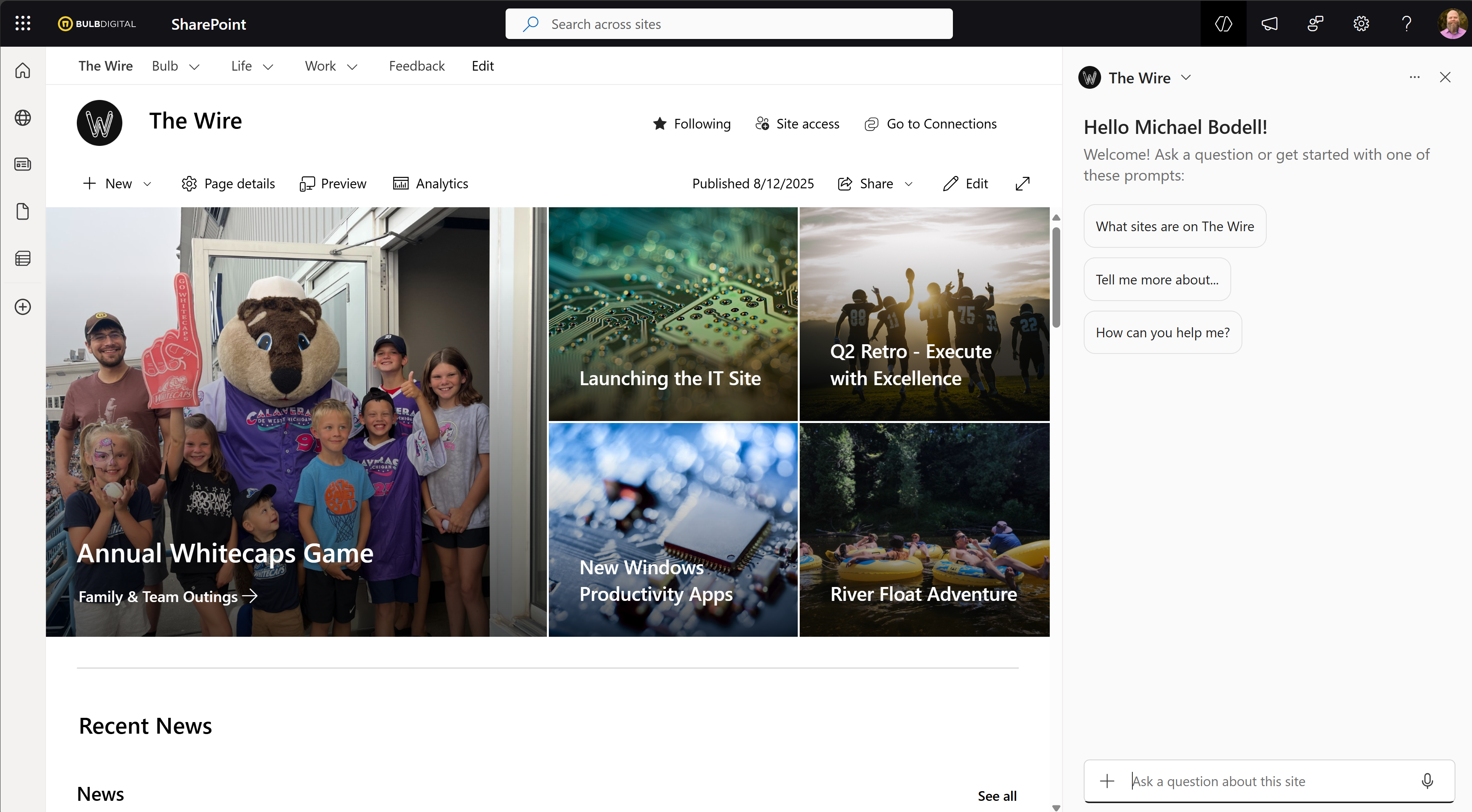
A Copilot Agent, in the SharePoint context, is an AI assistant that interacts directly with your SharePoint content. Think of it as a smart guide that can:
- Summarize documents
- Answer questions about your content
- Help users navigate sites, libraries, and lists
If you're wondering about how Copilot leverages your content structure / information architecture. Copilot Agents when used with SharePoint are:
- Scoped to the site they live on
- Security trimmed to respect user permissions
- Conversational in nature—making them feel more human than traditional search
This shift means users can ask questions and get answers in a way that feels natural, rather than digging through nested folders, wasting time with outdated search results, and opening documents to find a specific section or paragraph.
When it comes to SharePoint, there are two types of agents:
- Ready Made Agents: Instantly available within SharePoint
- Custom Agents: Tailored to your organization’s needs
SELF ASSESSMENT
Is your business getting full value from your M365 subscription?
Billions of dollars are wasted each year on underused subscriptions. Take 3 minutes to find out where your tools are driving results, and where they’re holding you back.
Find Out Now


Is Team Communication Holding You Back?
Find Out in Just 2 Minutes.
Take our quick scorecard to uncover communication gaps and hidden barriers within your team.
⚡ Ready Made Agents – What to Expect
These agents are built into SharePoint and ready to go. They are the "default" agent that lives at the top of every SharePoint site. They are:
- Accessible: No setup required. If enabled by IT, they just show up and are ready for your users to engage.
- Content-Driven: Their usefulness depends on the quality of your SharePoint content. This is where the time and effort spent on organizing knowledge pays off and why it's still important. Remember, content is king!
- Not Free: Event though they live in SharePoint, this agent functionality is enabled and paid for either by monthly credits in a pay-as-you-go model or in a more predictable cost model through named Copilot licenses.
If your content is well-organized and up to date, these agents can deliver fast, accurate answers. But remember they’re only as good as the content they can access.
🛠️ Creating a Custom Agent - When You Need More Control
But there's a bit more here than meets the eye. We all know that information architecture with SharePoint can include additional complexity like Hub sites as one example. So, if you want to accommodate a more complex scenario or even create an agent for a very specific purpose, there's more to do. This is where custom agents come in handy.
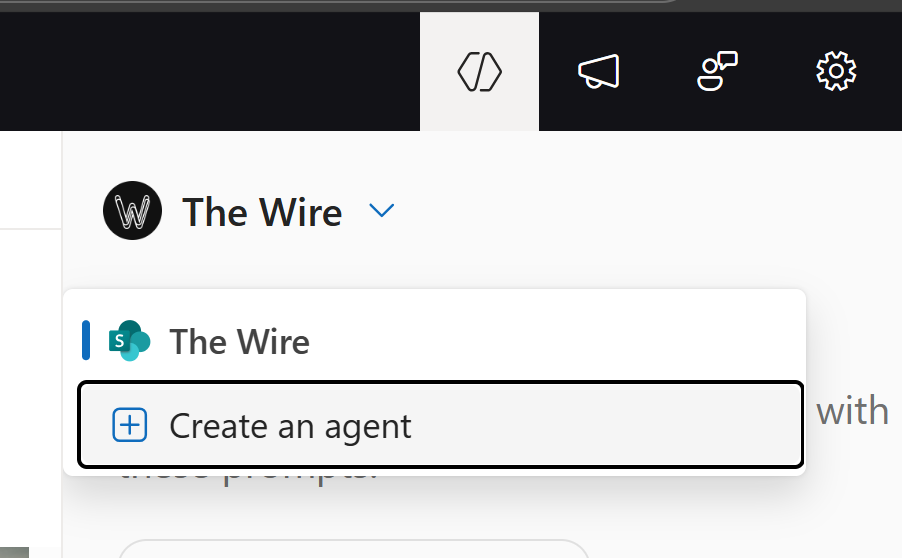
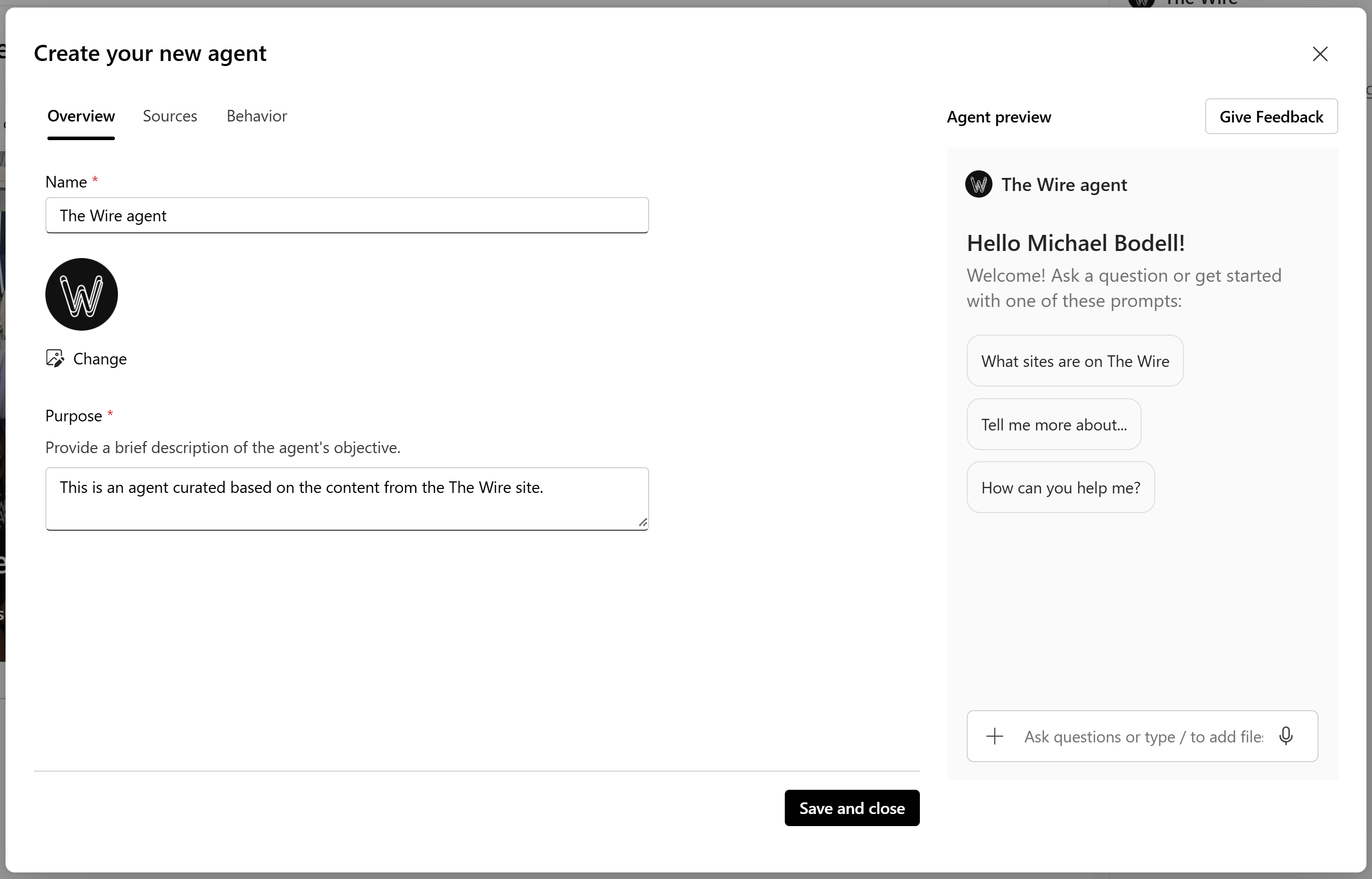
Custom agents let you define:
- Identity: Name, description, logo
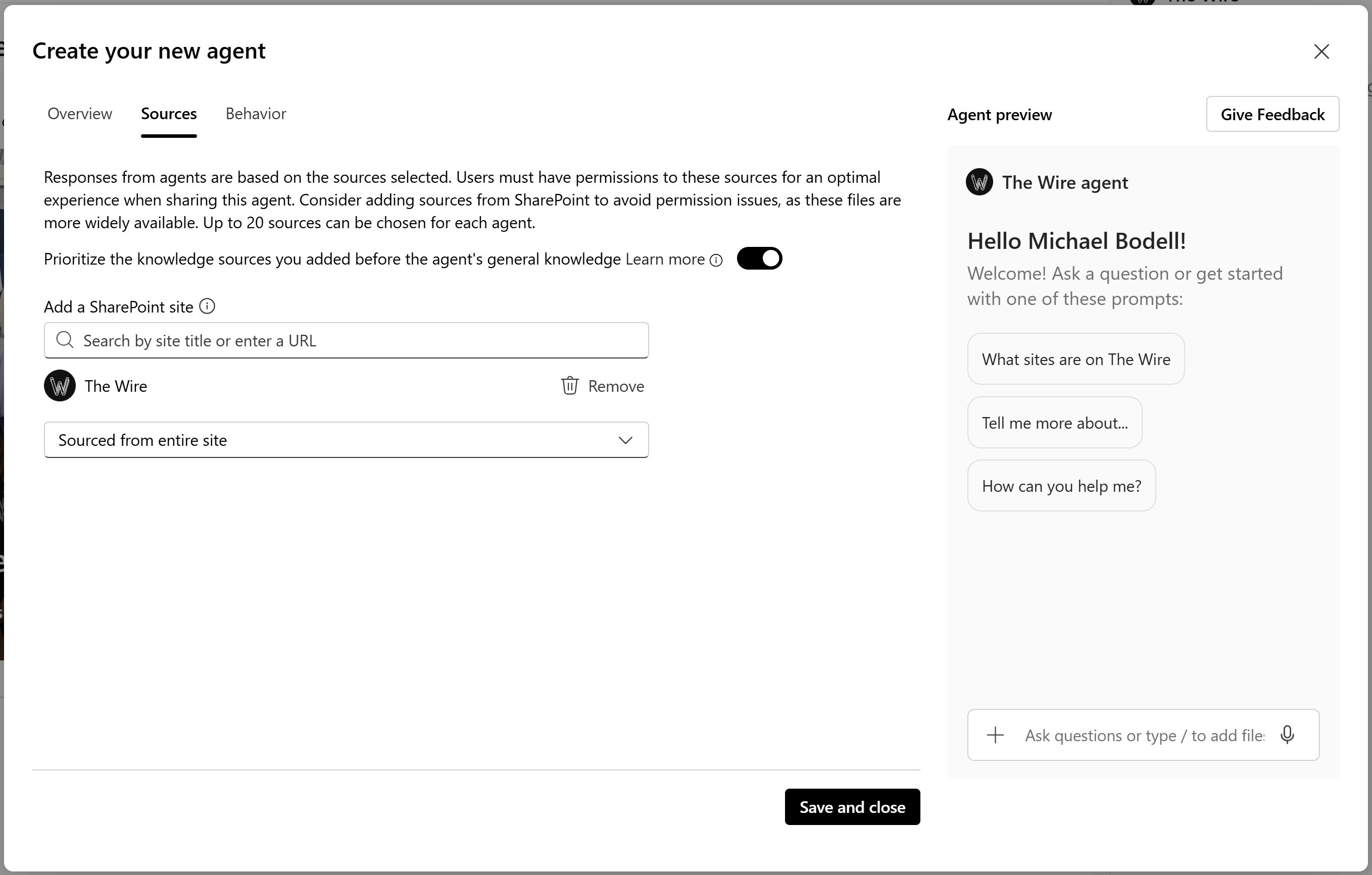
- Scope: Which sites, libraries, lists, specific files, or other sources they can access.
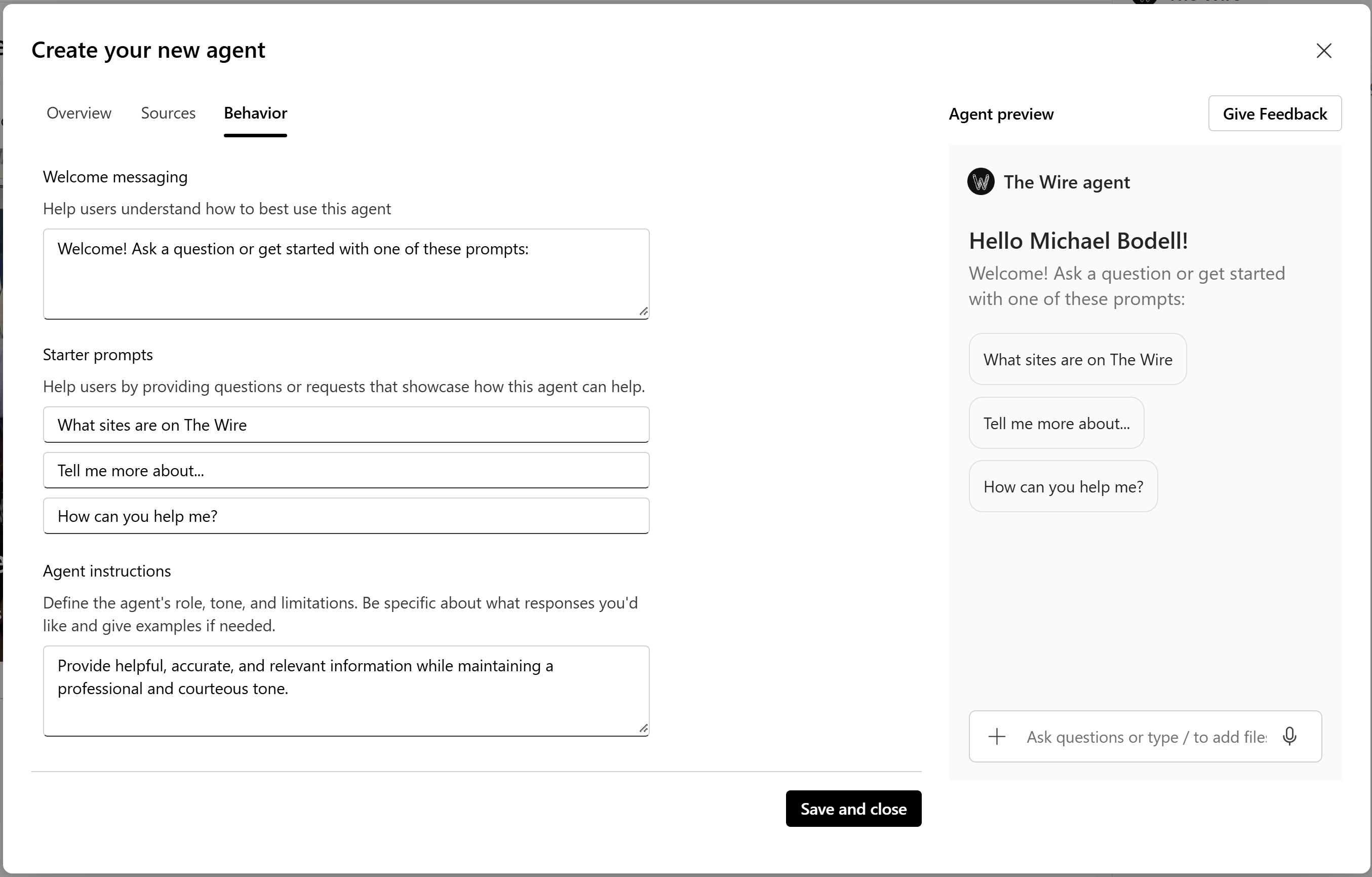
- Behavior: Welcome messages, suggested prompts, tone of voice
To build a custom agent, you’ll need:
- A Copilot license or a pay-as-you-go plan
- Proper permissions and sensitivity labels to ensure secure access
Custom agents are ideal for specialized workflows, department-specific knowledge, or branded internal support. But don't get too carried away, there are some important callouts to consider.
First don't go crazy and create many "single-purposed" agents. This will just get messy, confusing for users, and difficult to manage.
If you're trying to create something like an "Intranet Agent" that covers the full breadth of your company portal, you'll need to create a custom agent, but you might want to consider doing this with an agent created in Copilot Studio. This will enable you to have more control over the efficiency of the agent, which will save you money. This will also allow you to surface the agent anywhere in the digital landscape (not just in SharePoint). More on this in a future post.
Pro-tip: SharePoint Agents live in SharePoint. That's right, they're not agents created in the Power Platform. They actually live in the Site Assets library in a folder named Copilots. When you need to delete an agent... this is where you'll find it. If you need to secure an agent differently from the standard site permissions (we don't recommend it... DON'T DO IT!!!), this is where you could break inheritance to share or restrict an agent.
✅ Takeaways & Next Steps
- Access Matters: Agents can only see what they’re allowed to. Permissions are key.
- Content Quality Is Critical: Garbage in, garbage out. Clean, structured content leads to better answers.
- There’s a Cost: Whether through licensing or consumption-based pricing, plan for it.
Copilot Agents are a powerful way to unlock the full value of your SharePoint investment and improve the experience for your users. Whether you start with ready-made agents or build your own, the future has arrived for your team—and it’s intelligent, fast, and user-friendly.