

Is Microsoft Loop Still Relevant in 2026?

We've been screaming about Loop from the rooftops for years. Today we discuss what Loop might look like in the future and how Copilot changes that trajectory.
We’re coming up on five years of Loop, and somehow it feels like we have less clarity about its future than we did at launch. That might sound dramatic, but it’s been hard to ignore lately; especially if you’ve spent any time on Loop's social channels which talks more about Copilot than Loop itself. That shift feels pretty telling. Loop hasn’t been abandoned, but it also doesn’t feel like it’s being pushed forward as the "Notion killer" that some of us (me) hoped it could be.
Instead, it’s slowly looking more like infrastructure for other M365 products than the star of it's own show. That’s not necessarily a bad thing, but it does raise some questions. So, let’s talk about where Loop is today, how it’s being used (sometimes without you even realizing it), and what we think its ever-growing relationship with Copilot says about the future of Loop.
Ripping the good stuff out and putting it into Copilot
The team at Microsoft built something really great in the "fluid" surface of Loop. It's interesting writing that... while I'm writing this in Loop. Back in 2019 they teased this concept of a "fluid" document that didn't really have the constraints of normal documents and could move across Microsoft 365 and be edited simultaneously by everyone involved. This eventually got transitioned/adjusted into what we know today as Loop.
Where the everyday worker is used to very specific formatting options in things like Word docs, Loop instead says "don't worry about that, just keep things simple". And the default settings Microsoft chose are actually good. Plenty good for the casual collaboration space.
Years later, as we know, AI is blowing up. These different chat interfaces, models, and how they take away all the busy work is being screamed at us by every corporation. In the process of using these tools, AI can get pretty close to what you want, but it can sometimes require some tweaking. In Copilot, Microsoft decided to leverage something they had already built to facilitate that, and that is through "Loop" Pages. You'll see them refer to these pages as "Copilot Pages" (because Copilot everything, right?), but at its heart is just Loop.
You get a response from Copilot, you select "edit in Pages", and it takes the response and creates a Loop page in your Personal Loop Workspace with it. This happens all conveniently right within the Copilot app with you knowing none the wiser. There you'll find all the text editing features you'd expect to find in a Loop page, but not quite the "full" Loop page experience.
It's hard to know if this the future of Loop or just an interesting integration. In general, it's great to see some consistency between tools when we all know they could have created ANOTHER text editor. Instead they're using some powerful infrastructure they've created to improve their Copilot experience.
Am I annoyed that Copilot pages can't live inside a Team‑based Loop Workspace and instead just pile up in my Personal Loop Workspace?
You better believe it.
Have I told Microsoft that directly?
Sure have.
So... Loop has certainly been used to improve the features of Copilot, but the good news is all of the dev time on Copilot is also flowing back to improve Loop in some ways:
Copilot in Loop pages rework
Now that I say that, I'm attempting to use this new feature while writing this very blog... but it actually doesn't seem to be working? 🙃
Instead of the "draft page content with copilot" and "copilot chat" avenues, they have simplified it into the side chat, and made it more agentic by giving it the ability to edit the page directly. This sounds great in theory because the draft content with copilot feature created a separate "component" on the page that took things out of the flow and made edits difficult.
That being said, we’ve done a lot of testing with this new agentic ability and haven’t had much success. Almost every request starts the same way: I ask Copilot to do something, it executes the request really well… in the chat window. Then it just refuses to actually make the change on the page itself. A lot of the time it even responds as if the edits already happened in the page, when they clearly didn’t. And every so often it’ll finish with something like, “Now all you have to do is copy this into your page!”, which kind of defeats the point.
This new version sounds much better... if It actually starts to work.
SELF ASSESSMENT
Is your business getting full value from your M365 subscription?
Billions of dollars are wasted each year on underused subscriptions. Take 3 minutes to find out where your tools are driving results, and where they’re holding you back.
Find Out Now


Is Team Communication Holding You Back?
Find Out in Just 2 Minutes.
Take our quick scorecard to uncover communication gaps and hidden barriers within your team.
Planner integration going away?
This one came out of nowhere. The Planner team has been up to some interesting infrastructure changes in regard to consolidating Basic and Premium plans (thank you, Lord), but as part of that process, there's likely to be some losses along the way.
One of those is that cool feature where you can drop a view of a Planner board right onto a Loop page natively. It only ever supported Basic plans, but it was still nice to bring things into one view.
This sort of snuck up on us via a Message Center post where they announced the feature's deprecation as part of their consolidation process. It naturally brought up a spiderweb of questions in our mind:
- What does this mean for how we're using it today?
- Shoot, I have content out there that shows people how to use this, now it's going away.
- Will it ever come back? The wording in the post sounds "hopeful" but far from definitive.
- Will this start happening with other Loop integrations?
Either way, it's not a huge loss for us at the moment. We didn't use it a ton, but we have at certain points in the past.
After talking with the Planner team about this situation, what I can say is: there's a lot of good intentions with the future of Planner and I'm willing to put something like this feature aside for the work they're doing right now.
So, some losses along the way, but there is a win we want to talk about:
Team-based Loop Workspaces
This one is a little bit of old news, but we haven't written about it yet. This one of those "guys, they did it" moments where something we had been asking for from the start of Loop came to fruition.
When you created a Loop Workspace originally, it would create a "roster" permission configuration where you had to manually add people to the Loop workspace.
We had WAY too many instances where we had a team setup in Microsoft Teams for collaboration purposes and also wanted to have a Loop Workspace to go with it. But we always had to manage the permissions of it manually - if a new person joined the team, you would have two places to go update it.
Now, all you have to do is go into a Teams Channel, select "add new app" in the tabs on top, and select Loop.
This creates a Loop workspace whose permissions are directly tied to who is a member of that team. If you add or remove team members, that gets reflected automatically in Loop as well. Super cool.
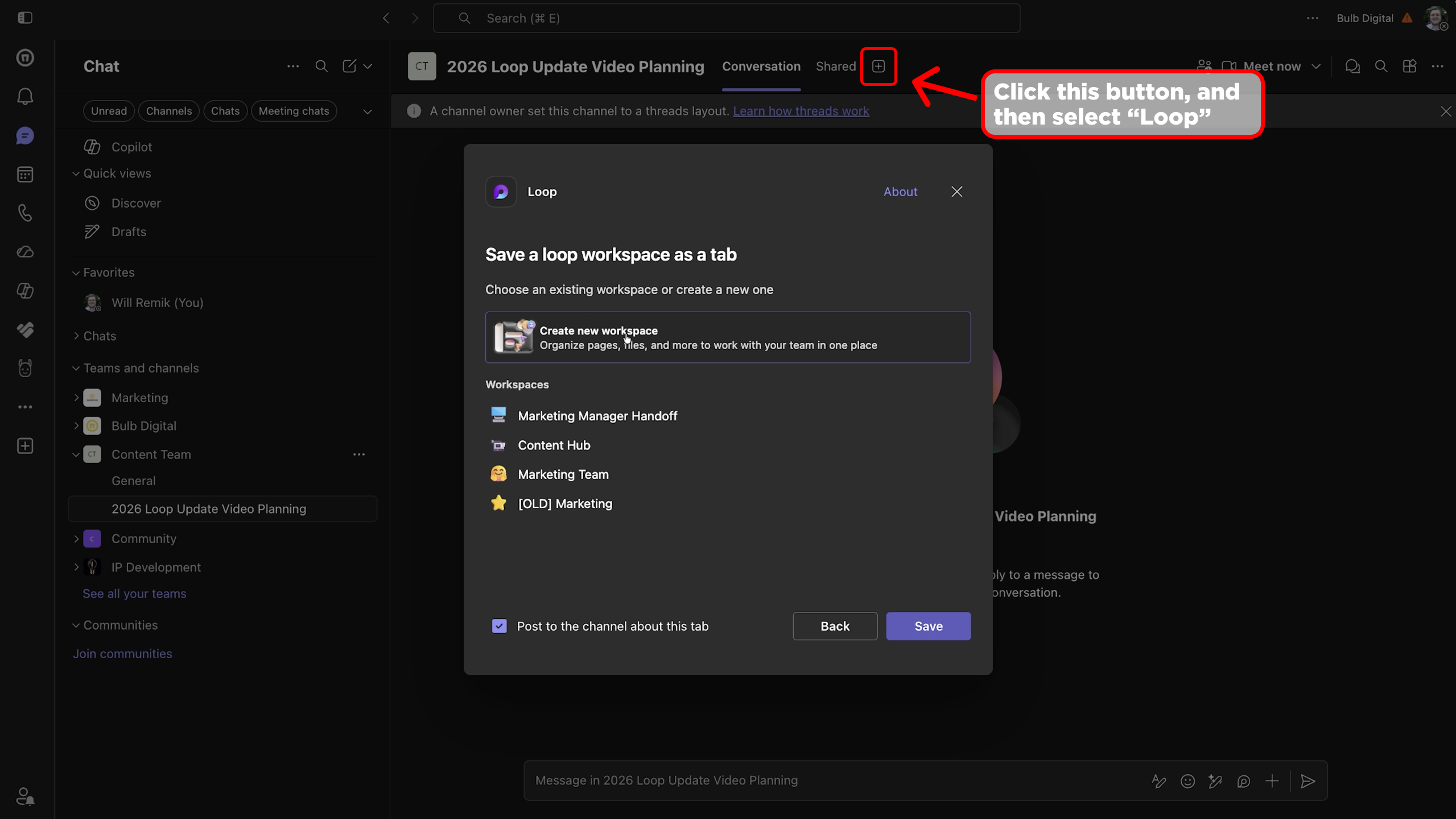
This should be the only way you create Loop Workspaces in our opinion.
What does Loop's future look like? (pace has been slow)
Nothing crazy to share here. Kind of like this blog post. There's things happening... slowly. Microsoft is running full force after making Copilot great, selling licenses and making up their billions of investments in AI. While Loop serves as some core infrastructure to some of that, the app itself has been "coasting" for a year or so.
I don't see that changing anytime soon. I don't think it's going away anytime soon. I don't think we'll see major features anytime soon. I think it just "is what it is and is going to be" for the time being.
How does this apply to your business? Please, use Loop for your casual collaboration space. Only create them in context of Teams. Don't shy away from it. We still have core business processes that rely on Loop, and don't plan on changing them anytime soon.
Is it ever going to be Notion? I don't think so. I have sort of given up on that dream. It's clear Microsoft doesn't have an appetite for making it this "jack-of-all-trades" super tool. They found a core use case for it, and pushed it into their AI tool.